
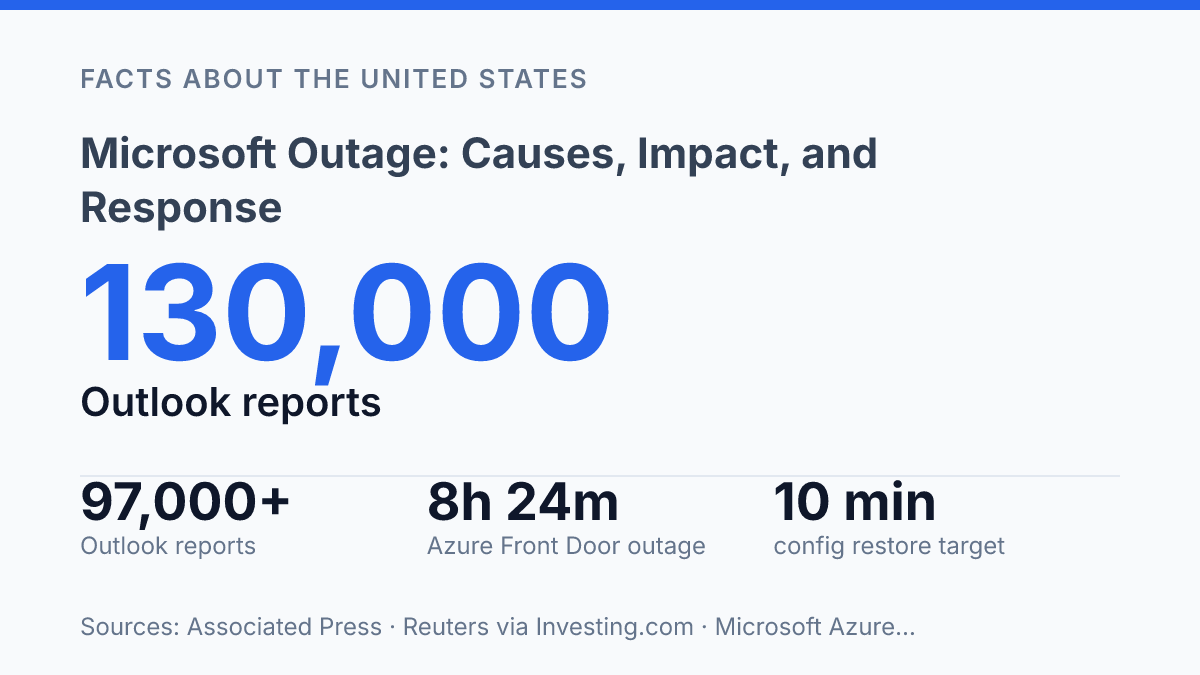
The November 2026 Microsoft outage reached a scale large enough for the Associated Press to cite nearly 130,000 Outlook problem reports, while Reuters counted more than 97,000 Outlook reports and 38,000 Microsoft 365 reports by 2:07 p.m. ET on November 12. The disruption was not limited to email. Microsoft’s service communications pointed to Exchange Online access problems in the Americas, while incident mirrors showed effects across Teams, SharePoint Online, Copilot 365, Defender, Intune, Power BI, Graph and other services.
The pattern matters because recent incidents were not caused by a single recurring flaw. Some failures involved unexpectedly unavailable servers and failed health checks; others traced back to authentication configuration or a latent Azure data-plane bug. The article examines how these failures unfolded, why their causes differed, and what Microsoft’s response reveals about the resilience of cloud productivity systems.
What happened during the outage
Outlook generated the clearest public signal of the disruption, with problem reports rising to nearly 130,000 at the peak while related complaints also appeared for Teams, Copilot, and Microsoft 365. Microsoft said users were having trouble accessing Exchange Online mailboxes through multiple connection methods in the Americas, according to the Associated Press. That framing makes the incident primarily regional rather than global, although the affected services were central enough that the disruption was visible well beyond a single product dashboard.
The disruption was reported on November 12, 2026, with public outage trackers showing a sharp surge during the early afternoon in U.S. Eastern time and Microsoft service communications continuing through the corresponding evening in GMT. The affected surface area centered on Microsoft 365 productivity services, especially Exchange Online and Outlook, but user reports also pointed to disruption around Teams and Copilot. Because Exchange Online underpins business email access across desktop clients, mobile apps, and web sessions, the same service issue could appear to users as several different failures rather than one uniform error.
Early outage figures should be treated as provisional unless Microsoft later confirms them in a post-incident report. Third-party reporting platforms count user-submitted complaints, which can rise faster than official telemetry but may include duplicate reports, delayed reports, or symptoms from dependent services. Even with that caution, the scale of the Outlook reports and the presence of related Microsoft 365 service complaints showed that this was not a narrow local interruption affecting only a small subset of accounts.
What caused the service failure
The clearest official clue was not excess user demand, but an internal capacity problem: Microsoft reported that many servers were unexpectedly unavailable, and that the remaining affected servers were failing automated health checks. In mirrored Service Communications API updates, Microsoft attributed the elevated load to server availability rather than to a public internet routing issue or a confirmed DNS failure, according to Cloud Admin Hub’s copy of the service-health messages. That distinction matters because a failed health-check pattern usually points to internal service infrastructure being withdrawn from rotation or judged unfit to receive traffic, leaving fewer healthy systems to absorb normal demand.
The confirmed explanation as of November 12, 2026 therefore sits in the category of Microsoft 365 infrastructure failure, not a verified cyberattack or externally caused connectivity event. Microsoft’s public wording did not identify a single bad software update, authentication change, or DNS misconfiguration as the trigger for this incident.
The available incident language supports a narrower conclusion: Exchange Online and related Microsoft 365 pathways were impaired because part of the serving fleet was not available or not passing automated validation checks. Any claim that a specific code deployment, security incident, or third-party network provider caused the disruption would go beyond the evidence Microsoft had made public in those updates.
Previous Microsoft incidents show why early explanations should be treated as provisional until a post-incident review is published. A separate August 31, 2026 Microsoft 365 outage was tied by reporting from ITPro to a core authentication configuration used across several services, a different failure mode from server unavailability.
The October 29–30, 2025 Azure Front Door incident was broader still: Microsoft’s Azure status post-incident review said valid customer configuration changes exposed a latent data-plane bug, producing an outage that lasted 8 hours 24 minutes. Compared with those cases, the November service failure was described more as a health and capacity problem inside the Microsoft 365 service estate than as an authentication or edge-network configuration defect, though a final review could refine that chain of causation.
How users and businesses were affected
An email access failure becomes a business interruption when the same inbox carries sign-in links, purchase approvals, support tickets, and meeting invitations. At 2:07 p.m. ET on November 12, 2026, Reuters counted more than 97,000 email-service complaints, more than 38,000 reports for the wider productivity suite, and 4,500 for the video-meeting app, according to Reuters via Investing.com. For an individual user, that could mean a mailbox that would not load or a meeting link that could not be reached; for an organization, the same failure could slow approvals, stall customer responses, and interrupt scheduled calls across entire teams.
The effects also reached business tools that sit behind routine work rather than in front of customers. A University of Pennsylvania Microsoft incident mirror listed impacts across services used for collaboration, file access, task management, device administration, security monitoring, analytics, printing, virtual desktops, application access, and education features as of 00:45 UTC on November 13, 2026. That record points to practical consequences beyond email: employees could have trouble reaching shared documents, administrators could face delays managing devices, analysts could lose access to reporting dashboards, and schools using education-specific features could see class or administrative workflows interrupted.
Third-party integrations widened the operational effect. Reuters reported knock-on issues for OpenAI and Anthropic productivity-suite connectors, which meant some users were not only blocked from Microsoft-hosted work but also from tools that depended on Microsoft accounts or data connections. This matters because many organizations embed those connectors into research, drafting, support, or internal knowledge workflows, so a service failure can disable steps that appear to belong to a separate vendor.
The documented record for this incident does not support naming airlines, hospitals, banks, or government agencies as affected institutions. The clearest documented sectors and settings were enterprise workplaces and education users, where the immediate consequences were access failures, delayed communication, postponed or missed video meetings, and temporary interruption of cloud-hosted business processes.
How Microsoft responded and what changed after
Recovery began with capacity management rather than a user-side workaround: the available service-health record points to Microsoft restoring usable backend capacity and allowing traffic to be served by healthier infrastructure while affected services came back in stages. The updates did not identify a specific application release or configuration change that was rolled back, which matters because a rollback implies a different remediation path from replacing, reviving, or rebalancing unavailable server capacity. In practical terms, the response was centered on service-side mitigation, not customer reconfiguration.
The recovery timeline also appears to have been staggered rather than uniform. Services began returning as Microsoft’s mitigation took effect, but staged restoration means recovery would have depended on which regional capacity, workload, and connection path a user or tenant was reaching. A tenant whose requests were already routed to restored capacity could see access return before another tenant still touching impaired infrastructure, so “service improving” would not necessarily mean all regions or clients were fully recovered at the same time.
Residual symptoms can persist after the main fix is deployed because cloud services cache state across clients, identity sessions, mailbox connections, and synchronization layers. Delayed mail sync, stale error messages, failed cached sign-ins, or temporary client retries can remain visible even after backend availability improves. That distinction is important when interpreting status updates from Microsoft: restoration can describe the return of core service health before every downstream session or client has cleared its earlier failure state.
The clearest longer-term remediation evidence comes from Microsoft’s public post-incident review process for a prior cloud-platform failure, where the company said it had reduced data-plane recovery time from about 4.5 hours to about 1 hour and planned further work to restore customer configurations within about 10 minutes by March 2026. Although that earlier review concerned a different failure mode, it shows the type of engineering changes Microsoft has committed to after major incidents: faster recovery automation, improved monitoring, and clearer operational playbooks for restoring service without waiting for manual intervention. For the November 2026 service disruption, the available record supports staged mitigation and continuing status communication, but it does not by itself confirm a final post-incident fix or guarantee that every residual user symptom ended at the same moment.
Where resilience targets meet shared platform risk
The next measure of Microsoft’s reliability will be less about whether outages disappear and more about how quickly complex failures can be isolated, reversed and explained. Microsoft’s post-incident review of the October 2025 Azure Front Door failure said data-plane recovery had improved from about 4.5 hours to 1 hour, with a target of restoring customer configurations within about 10 minutes by March 2026. That kind of target changes the standard by which future incidents will be judged.
For organizations dependent on Microsoft 365, the practical consequence is clear: resilience planning cannot stop at backup email access or status-page monitoring. It must account for shared identity, security, collaboration and automation layers that can fail together when one platform component degrades.
Frequently Asked Questions
Q: What causes a Microsoft outage?
A: A Microsoft outage can stem from software updates, configuration errors, authentication failures, cloud service problems, or network issues. In some cases, a single faulty change can affect multiple connected services at once, which is why the impact can spread quickly across email, collaboration tools, and business applications.
Q: Which Microsoft services are usually affected during an outage?
A: Outages often affect Microsoft 365 services such as Outlook, Teams, SharePoint, and OneDrive, as well as Azure-hosted applications. The exact scope depends on which component fails, so some users may lose access entirely while others see slow performance or intermittent errors.
Q: How long do Microsoft service disruptions usually last?
A: The duration varies widely because the cause determines the repair time. Minor configuration issues may be fixed within minutes or hours, while incidents involving distributed cloud systems can take longer because engineers must isolate the fault, apply a correction, and verify that services are stable again.
Q: How can users tell whether the problem is a Microsoft outage or a local issue?
A: A widespread outage usually affects many users, regions, or services at the same time, while a local issue is more limited to one device, account, or network. Checking Microsoft’s service status pages and independent outage reports can help distinguish between a platform-wide incident and a problem on the user’s side.
Q: What does Microsoft usually do in response to an outage?
A: Microsoft typically investigates the source of the incident, rolls back or corrects the change, and monitors recovery until services return to normal. Afterward, the company may publish an incident summary that explains the cause, the scope of impact, and any steps taken to reduce the chance of recurrence.